Thursday, April 16, 2009

BROADBAND SCHEDULER

BROADBAND SCHEDULER


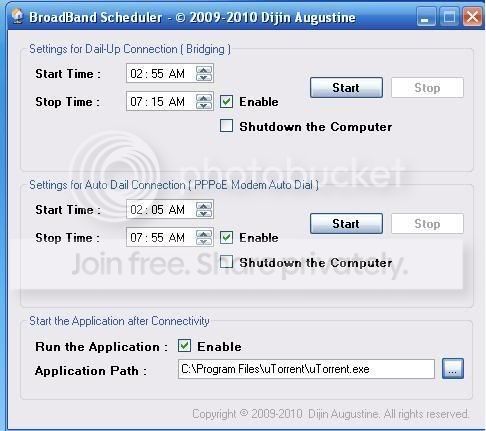
A software which enables n disables internet especially during the night free time downloads i.e 2-8 a.m in case of BSNL.


Instructions:

1) Before running this application disable ur network connection

2) If u have a PPPOE Auto Dial then enter the details like this


and click on start

the internet now will be enabled automatically at 2.05 n disabled at 7.55 and therefore there cannot be any unnecessary data transfer happening whch does happen in BSNL when the modem is on.


Free Download Manager to connect to internet at any given time , and then hang it up at any other given time ... u can then , set to launch the program at a particular time ... and then , shut the computer down at a particular time ...

so u come home at night , just start the computer ... and its set to work for next 24 hrs.

~Download~

http://www.sendspace.com/file/l2l93k

Tuesday, January 20, 2009

Dataone Broadband Night Free Manager Download

Dataone Broadband Night Free Manager Download


Download DataOne Manager

THIS SOFTWARE IS NOT A VIRUS!!

source

Solve Your BSNL DataOne Night Free Download Problem

BSNL Dataone is one of the widely used broadband internet service in India. It has different plans including Home 500, Home 500 C, Home 500 Combo plus etc. If you have one of the above dataone plan, you may have noticed that these plans comes with Night Free (Unlimited plan). So basically whatever you download during 2 AM to 8 AM would not count towards your monthly download limits.

Here is the catch though, DataOne averages the data usage over the sessionand then substracts 6 hours (2AM to 8AM) worth of the download. So for users of free night plan from 2AM to 8AM, they still have to switch off and switch on their modem at 2AM if they want to get really night free from dataone.

For e.g. If you connect at 10 PM and disconnect at 6 AM and download 400 MB data, downloading only during 2AM to 6AM, still the average is 50 MB/hour. So free usage is 50*4=200 MB and the rest (200 MB) is paid download.

Shajul has developed a software which allows you to connect and disconnect automatically at specified times. The software basically disconnects the modem at 1:58 AM and then connects back the model at 2:00 AM. During 2:00 AM to 8:00 AM you can have your downloads scheduled. Again at 7:58 AM it disconncts the modem and connects it back at 8:00 AM.

source

Make Utorrent FASTER!

Make Utorrent FASTER!

using Dataone unlimited downloads from 2 am to 8 am effectively

using Dataone unlimited downloads effectively 2 am to 8 am

step 1:

use windows scheduler to start the computer @ 2:10 am

step 2:

use utorrent download for scheduled downloads

Open utorrent Goto--> options --> Preferences --> select scheduler --> tick enable scheduler --> select 2 am to 8 am (as shown in fig) --> Apply --> OK

step 3:

use windows scheduler to shutdown the computer @ 7:50 am

Dataone Quick Usage Finder 0.7.0.0

Dataone Quick Usage Finder 0.7.0.0


Dataone Quick Usage Finder description
Dataone Quick Usage Finder (DQUF)is a freeware utility to quickly find the total usage for BSNLs Dataone.

Dataone Quick Usage Finder helps you be in total control of your usage.

Dataone Quick Usage Finder 0.7.0.0 Screenshot


Here are some key features of "Dataone Quick Usage Finder":

· Be in control of your usage
· Really Quick summary with very few clicks
· Less bandwidth consumption as all pages are not downloaded for getting the details
· More reliable stats, as its the same as what BSNL provides on their site
· Old months logs do work with old tariff
· Connect/Disconnect scheduler for night Unlimited plans
· (Its always safe and better to do this or youll have problems as bsnl will bill based on the time you started the connection and your night unlimited will have no benefit)
· Auto Detect Plan and usage limit according to plan which minimizes user input
· The last updated date time is same as the last record found in bsnl site, so you can be cautious on the usage,if BSNL site is not updated.

Download Dataone Quick Usage Finder 0.7.0.0

More...
Dataone Quick Usage Finder 0.7.0.0
Dataone Quick Usage Finder (DQUF)is a freeware utility to quickly find the total usage for BSNLs broadband service Dataone.


Dataone Quick Usage Finder 0.7.0.0

The Best Plan I Use

The Best Plan I Use

i am using home 500 plan

what is ur plan? make a comment about ur plan

Monday, January 19, 2009

What is Broadband?

Broadband is the name given to a high-speed internet connection that provide large bandwidth. It is a quick connection, typically “always-on” and capable of transmitting data at a much faster rate than a standard dialup modem connection. Broadband also won’t tie up your phone line, allowing you to use the internet and telephone simultaneously. Broadband an be provided from a dedicated line such as Cable or ISDN, or over the top of our phone line such as ADSL.Low-band Internet access is typically running up to 56kbps using a dial-up modem. Mid-band Internet is a phrase given to dialup that operates at 64kbps or 28kbps. Broadband starts at 512kbps (approximately ten times faster than typical dialup) and is also typically available at 1mbps, 1.5mbps and 2.2mbps. Some companies offer broadband at 4mbps and 8mbps. The maximum possible for able is around 26mbps and 24mbps for ADSL although these speeds are not sold commercially due to the high cost required to upgrade telephone lines to be able o transmit at this speed.With broadband you can quickly download or stream music and video. Many websites re designed especially for broadband users with intense integrated graphics, lash and video. Another popular use of broadband is online gaming. Xbox and PS2 consoles include broadband support, by subscribing to gaming packages from your SP you can play Xbox and PS2 games live with other people over the internet. Online PC gaming has been around since the early days of the internet, but now ith faster speeds there is less lag (slow or jerky response from the computer making it hard to play) and you are no longer keeping an eye on the time as you lay, making it much more popular. Many recent games are released requiring an internet connection, without them you simply cannot play.

Datafox for BSNL DataOne

Datafox for BSNL DataOne and MTNL Triband

DataFox is an easy to use, cross platform & customizable extension to Firefox, which you can use to monitor your DataOne Broadband

dataone-login.png
BSNL login dialog

withmenu.png
DataFox context menu

withtt.png
DataFox tooltip


Firefox Datafox Plugin Download


BSNL Offers Discount On Broadband Subscription

BSNL Offers Discount On Broadband Subscription

BSNL offers 20% discount in total Broadband bill (Rental+Usage) to State/Central Government and PSU employee with effect from 01/12/2008.

NEW DELHI: Keeping the festive season in mind, State-run telecom operator BSNL today announced a 20 per cent discount on rent for its new broadband customers for a period of six months starting from October.

The offer is applicable on all broadband plans for new broadband customers, the company said in a statement. The offer is also valid for all customers who have booked their subscriptions since October 1, the statement added.

The company offers broadband and Internet services besides telecom services in the country and has more than 2.7 million broadband users at present.

How to apply? Click here for details>>

Goto nearer customer care center / BSNL office for more details

BSNL Broadband Speed Tester

BSNL BROADBAND SPEED TESTER

Check Download Speed

BSNL Broadband Speed Test


GOto Check Download Speed

How to Chang Bsnl Dataone Password ? Change Portal Password

Change Bsnl Dataone Password for Security & unauthorized usage of bandwidth !

Goto http://data.bsnl.in/

Provide user id & password for login

Click on 'Change Portal Password'

give new password

Check BSNL Dataone Broadband Usage

How to check dataone usage ?

Checking BSNL Broadband Usage!

Goto http://data.bsnl.in/

u need to provide user id & password for login

click on My Services -->My Usage Details

Service Name:* Broadband (Select from drop down menu)

Account Number:* (Select from drop down menu)

Usage Status: Unbilled (Select from drop down menu)

Usage Dates: From Date: To Date:

Click on Search

Goto http://www.dataone.in/

Click on Usage detail Portal

Goto http://bbservice.bsnl.in/

tip to save broadband bandwidth

Another tip to save broadband bandwidth (not only BSNL )

Use a GOOD Anti Virus

But how can anti virus help me to save bandwidth?
Most of the modern day virus and trojans are capable of auto-updating themselves. There are also similat malicious programs which send out data packets without your knowledge. And this will increase the bandwidth usgae and will give you a huge bill. This is where a good anti virus can help. Unfortunately, most of the anti-viruses available today are costly and are not affordable for common man in India. But, we have many good anti virus softwares which are available for free. And, they are as good as the paid ones and some outperforms the paid counterparts.

Here is a list of some free anti virus softwares.


And never use two anti-virus softwares simulatenously. Doing so will not help you much and also they eat up a lot of system resources. Though you can use anti-spywares along with it. And we reccomend to use ananti-spyware along with the anti virus software.

Here is a list of some FREE anti-spyware softwares.


So, install these, and update to latest definitions, do a complete system scan. Remove all those infections and notice the change in bandwidth usage and download / upload speed.

source

Save bandwidth For Firefox users

Save bandwidth For Firefox users

The trick is same as that of Internet Explorer. Well, in this case it can be done using an Firefox extension called Flashblock.

WARNING:- Never install this extension, if your Firefox version is below 1.5 and in such a case, upgrade the browser and then install this plugin.

Restart the browser and you will be amazed to see, the flash ads being blocked. This plugin also has the option to exempt some sites (likeonline greeting sites etc) from block.

And this Firefox extension successfully blocks the following:
  • Macromedia Flash

  • Macromedia Shockwave

  • Macromedia Authorware
To know more about this firefox extension, please visit http://flashblock.mozdev.org/

source

Improve the broadband performance in Windows XP/2003

Improve the broadband performance in Windows XP/2003

Well, before doing this....do this test

1) Goto http://www.testmy.net/ and click on Download Speed Test, and then on Smart Test....(and while conducting this test, don't forget to close all Instant Messagers, and there should be no other web activity, other than the test)

2) Note down the speeds.


Now, lets see, what all changes to be made.....

This tip is designed for increased BROADBAND speed in Windows XP while using standard Network Interface cards (NIC) that are connected to ADSL modems, or when using any directly-connected USB ADSL modem.

To speed up the Internet connection speed we need to configure a special buffer in the computer's memory in order to enable it to better deal with interrupts made from the NIC or the USB modem.

This tip is only recommended if you have 256MB RAM or higher.

Step #1 - Identify the IRQ used by the NIC/USB modem

1. Open the System Information tool by running MSINFO32.EXE from the Run command.
2. Expand System Summary > Hardware Resources > IRQs.
3. Look for the listing made for your NIC (in my case - a Intel® PRO/100+ Management Adapter). Note the IRQ next to the specified line (in my case - IRQ21).

In case of USB modems you will first need to find the right USB device used by your modem. Follow these steps:

1. Open the Device Manager tool by running DEVMGMT.MSC from the Run command (or by right-clicking My Computer > Hardware tab > Device Manager button).
2. Scroll down to Universal Serial Bus controllers and expand it.
3. Right-click the USB Root Hub and select Properties. Note that you might need to do so for all listed USB Root hubs (if there are more than one) in order to find the right one.
4. In the Power tab, look for your USB ADSL modem.
5. In the Resources tab look for the assigned IRQ (in this case - IRQ21).
6. This is the IRQ we're looking for.

Note: IRQs and modem names might vary...

Step #2 - Modify the system.ini file

1. Run SYSEDIT.EXE from the Run command.
2. Expand the system.ini file window.
3. Scroll down almost to the end of the file till you find a line called [386enh].
4. Press Enter to make one blank line, and in that line type IrqX=4096 where X is the designated IRQ number we found in step #1, in my case it's IRQ21.

Note: This line IS CASE SENSITIVE!!!

5. Click on the File menu, then choose Save.
6. Close SYSEDIT and reboot your computer.

Done. Speed improvement will be noticed after the computer reboots.

NOW DO THE SPEED TEST AGAIN (MENTIONED IN THE BEGINNING) AND NOTICE THE CHANGE IN SPEED

The most speed improvement is visible with USB.

WARNING:- It worked for me....am not sure whether it will work for you...

source

BSNL Dataone ADSL Router Configuration

Configuring BSNL Dataone on SmartAX MT882 ADSL Router

This tutorial will help you to configure, SmartAX MT882 for manual dial....and the advantages??...more flexibility over the connection...

1) Select TCP/IP properties and enter as follows

set ip Address As 192.168.1.29
Subnet Maswk As 255.255.255.0
Default Gategay As 192.168.1.1
Prefferd DNS 61.1.96.69
Alternet DNS 61.1.96.71

2) Save settings and restart the computer.
3) Open your browser (preferably Internet Explorer ) and goto http://192.168.1.1/
4) Input as follows
USERNAME: admin
PASSOWRD: admin
5) Now goto Home->WAN Settings and there,

PVC Number - PVC-0
Wan Type - RFC2684Bridged
VPI/VCI - 0/35
Encap. - LLC

Apply and restart the modem.

6) Now goto Control Panel-->Network Connections
7) Create New connection-->(and a wizard will pop up) Next-->Connect to Internet(Select the radio button and click next)-->Setup My connection Manually(select it and click next)-->Connect using a broadband connection that requires a user name and password (select it and click next)-->ISP name (type something, anything and click next)-->Type in the Username and password given to you in the specified coloumns also select the other options if you want to (and click next)-->If you want to add a shortcut of connection to desktop, check that square box and click finish.

Diouble Click the Icon in the desktop to connect to the BSNL Dataone broadband connection, and either double click the same icon or right click the system tray icon to disconnect from BSNL Dataone broadband connection.

Source

Dataone Usage Finder

Dataone Usage Finder


Download Latest Version Dataone Usage Finder

Tariff

Tariff

INITIAL AND OTHER CHARGES

Startup Plan (Home & Business)

Home Plans


Home Unlimited Plans


Home Combo Plans


Business Plans


Business Unlimited Plans


Business Combo Plans


Business 8 Mbps Plans


Temporary Broadband Connection


VPN Over Broadband


Wimax Broadband Plan


BSNL broadband connection

BSNL broadband connection apply

|
Apply Online | Download Form | Check Usage |


check your BSNL Dataone Usage

check your BSNL Dataone Usage

Configure BSNL Broadband on Vista

Configure BSNL Broadband on Vista

BSNL Dataone Modem Configuration

BSNL Dataone Modem Configuration